Transfers
Send large files, and know who downloaded them
A Transfer delivers files through a private link that expires. Each Recipient gets their own link by email, and you see who has downloaded.
Anyone can sign up and create a free Workspace now.
How it works
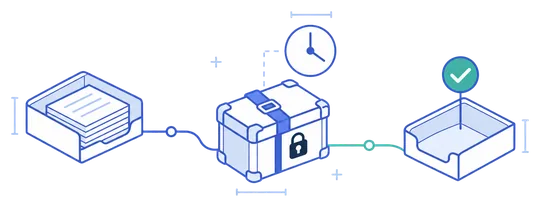
Drop your files
Drag them onto Ferry, or pick them. They upload straight to storage while you write.
Say who gets them
Type your Recipients’ emails, or keep one link to share yourself.
Choose how long
Pick when the link expires, and add a password if you want one.
Send
Ferry emails each Recipient their own link, from your name, with replies going to you.
Everything a delivery needs
A link for each Recipient
Each Recipient gets their own link, so you see who downloaded and when.
Or one link to share
Paste a Shareable link anywhere, and switch it off whenever you want.
Expiry you choose
1, 3, 7 or 14 days. Extend it while it’s live, or renew it within 3 days of expiring, up to 30 days in all.
An optional password
Shown to you once, never sent by email, and replaceable whenever you like.
Reminders
Before the link expires, Recipients who haven’t downloaded get a reminder, and you get an email on the first download.
Download all
Recipients can take every file at once, in a single zip.
Revoke at any time
The link stops working and the files are deleted at once.
No account to download
Recipients open the link and download. That’s all.
Frequently asked questions
What does the Recipient receive?
An email from “your name via Ferry” with the Transfer’s title, your message and their own link. Replies go to you.
Can I see who downloaded?
Yes. Each Recipient has their own link, so the Transfer shows who has downloaded and when. Downloads through the Shareable link are counted too.
What happens when a Transfer expires?
Its links stop working. For 3 days you can still renew it, and after that its files are deleted for good.
Can my AI agent send a Transfer?
Yes. With an API key that allows it, an agent creates a Transfer, uploads the files and sends it through Ferry’s MCP server.
Send your first Transfer today
Free for a team of 5, with a 10 GB Library and 20 GB for Transfers. No card, no plan to pick.
Anyone can sign up and create a free Workspace now.